
New Just launched from Inherent
Introducing Client Intake: know which inquiry to call back first.
Client Intake reviews every inquiry from your website, scores it 0 to 100 against your own practice areas, and puts the best ones in front of an attorney first.
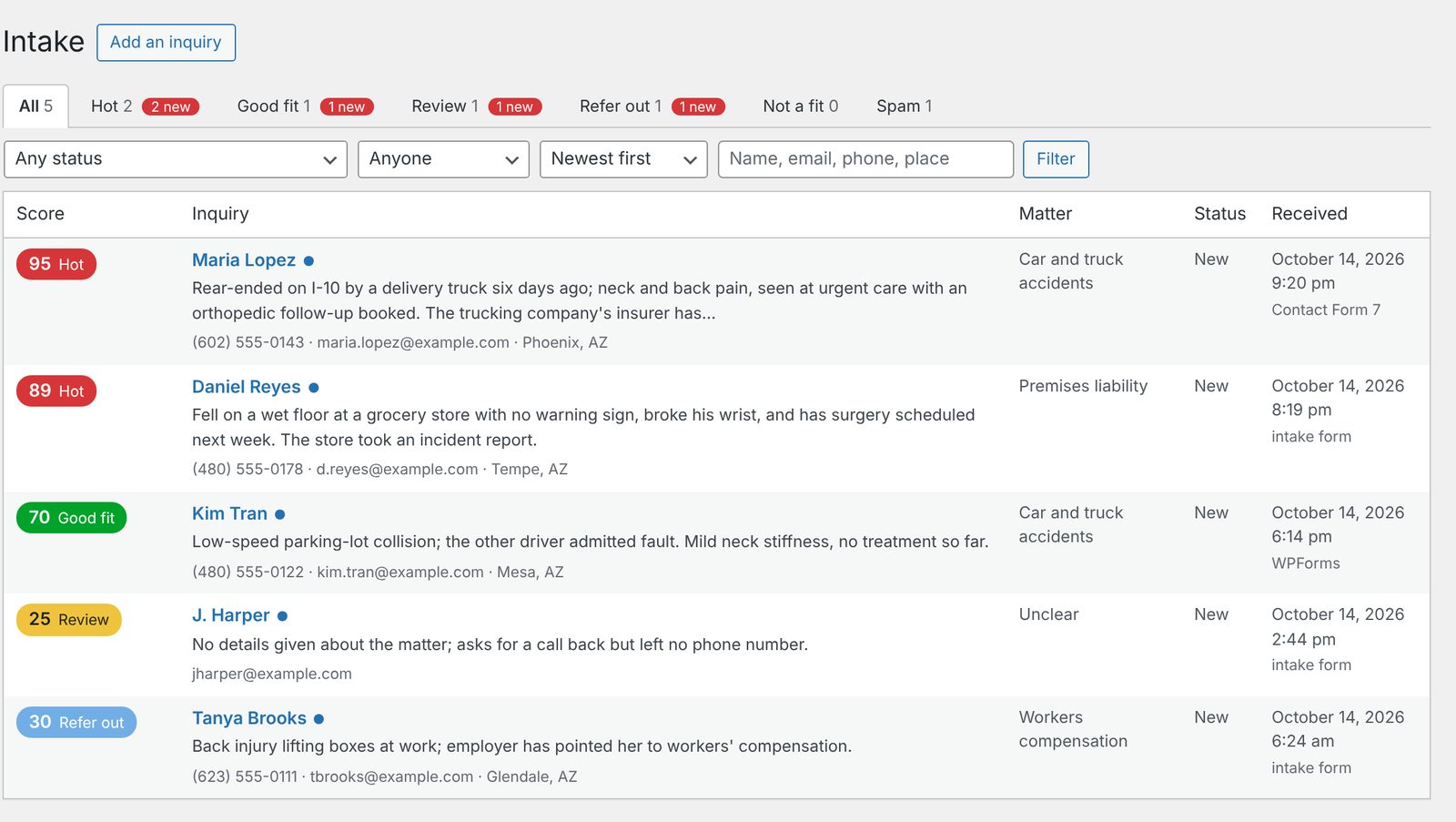
The intake inbox, with sample inquiries.
A law firm’s website brings in a steady mix: the matter you were built for, a case you would refer out, someone three states away, and a sales pitch. They land in the same inbox, and the good one waits behind the rest. Client Intake reads every inquiry the moment it arrives, scores it 0 to 100 against your own practice areas, puts it in a bucket and shows you why, so the right one gets the first call.
Every inquiry, scored
Each inquiry is scored against your practice areas, your service area and the things that make a matter worth taking at your firm. Every point is shown with its reason, so nobody has to trust a black box.
Sorted into six buckets
Hot, Good fit, Review, Refer out, Not a fit and Spam. An area you refer out or don’t handle goes to its own bucket whatever the score, and your staff can move any lead.
Hot leads, to an attorney at once
A Hot inquiry emails the attorney the moment it is reviewed, with the contact details and why it scored the way it did. Everything else arrives in one daily summary, best first.
How it scores
Each inquiry is scored by your firm’s rules the moment it arrives. With the AI review on, it is then read in full (the matter, where they are, how urgent it is, whether they already have a lawyer) and scored again. The visitor never waits for any of it.
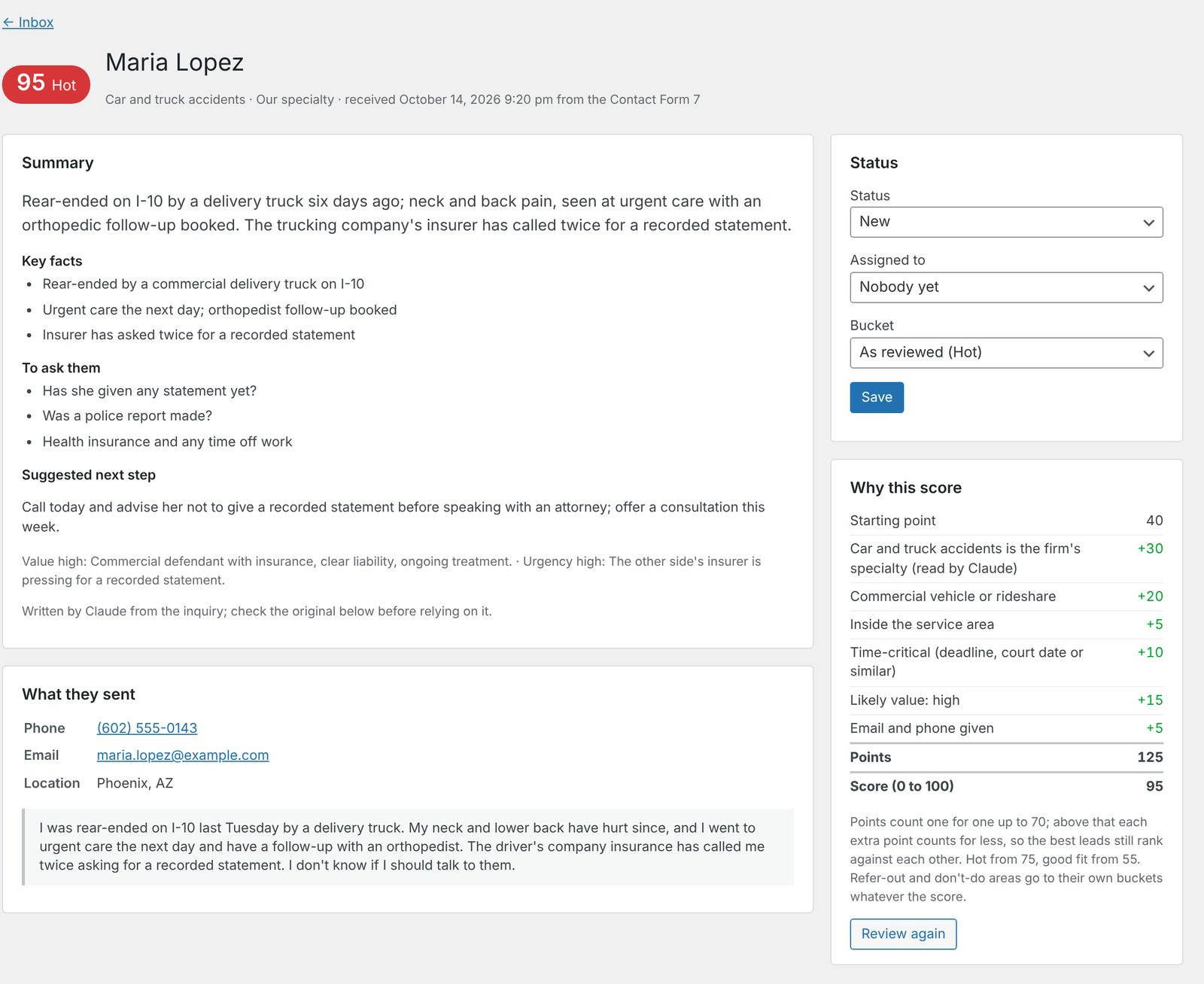
Here is a personal injury firm’s inquiry from someone rear-ended by a delivery truck last week, with the other driver’s insurer already calling:
| Starting point | 40 |
| Personal injury, the firm’s specialty | +30 |
| Commercial vehicle involved | +20 |
| Likely value: high | +15 |
| Time-critical: insurer already in contact | +10 |
| Inside the service area | +5 |
| Email and phone given | +5 |
| 125 points, score 95: Hot |
Strong leads still rank against each other: above 70, each extra point counts for a little less, so a great inquiry reads 95 rather than another 100. Someone outside your service area, someone who already has a lawyer, or a message with no way to reach them scores lower. Sales pitches and link spam go to Spam.
The rules are yours. List what you do, what you refer out and what you decline, and under each area the signals that make a matter worth more or less to you, with the points each is worth. Starting setups for personal injury, family law, criminal defense and business and estate planning get you going.
What your team sees
- The inbox. Tabs for each bucket with counts, sorted by newest or best score, filtered by status, attorney or search.
- A two-minute summary. Each lead opens on the matter in two or three sentences, the key facts, what to ask them and a suggested next step, above everything they wrote, word for word. Value and urgency come with the reason behind them, and any deadline is pulled out.
- Reply from the lead. A template picked for its bucket (book a consultation, ask for more, refer elsewhere, decline politely), filled with their name, your firm and your booking link.
- Assign and track. Assign it to an attorney, who is emailed, and follow it from new to contacted, consultation booked, retained, referred out or declined.
- A conflicts flag. Other people and businesses involved are listed, and an inquiry is flagged when it crosses an earlier one, in either direction. Your own conflicts check still applies.
Common questions
Do we have to replace our contact forms?
No. Client Intake captures inquiries from the Contact Form 7, WPForms, Gravity Forms and Elementor Pro forms already on your WordPress site, and you choose which forms count. It also comes with its own intake form, which asks in plain language what a firm needs to know: the matter, what happened, where, any deadline, who else is involved and how they heard about you.
Does the AI decide who we take?
No. It ranks and explains; your team decides. Every point of the score is shown with its reason, staff can move any lead to another bucket, and the review’s original call stays visible beside theirs.
What happens if the AI review is off or fails?
Your firm’s rules still score every inquiry: keyword matches decide the practice area, the value signals, urgency and spam. The lead page says when a review failed and why, and “Review again” re-scores it.
Where does the information go?
It stays on your website. What the person wrote, the review, notes and replies are encrypted in your own WordPress database, and inquiries are deleted after the number of days you choose. The AI review runs on your firm’s own Claude, ChatGPT, Gemini or Perplexity account, at cost (about three cents an inquiry with Claude), and instructions hidden inside an inquiry are ignored.
What does it need to run?
A WordPress site and, for the AI review, an API key from the provider you choose. We install it, load the starting setup closest to your practice and tune the practice areas, service area and signals with you until the ranking matches how your attorneys would sort the pile themselves.
See your own inquiries, ranked
A short call and we’ll show you Client Intake on a firm like yours, then set it up on your site with your practice areas.